


Iran Says Four Satellites Ready For Launch
Iran has four homegrown satellites awaiting launch, Minister of Communication and Information Technology Mohammad Javad Azari Jahromi said.
Iran has four homegrown satellites awaiting launch, Minister of Communication and Information Technology Mohammad Javad Azari Jahromi said.
In an address to a Saturday conference on space technology, Azari Jahromi said Iran has made great headways in developing research satellites, such as those used for measurement or telecommunication purposes.
Three satellites are in the final pre-launch stages before going to orbit, while another one is all set for launch, he added.
Iran has in recent years made advances in the space technology thanks to the efforts made by its local scientists.
The country successfully launched its first indigenous data-processing satellite, Omid (Hope), into orbit in February 2009.
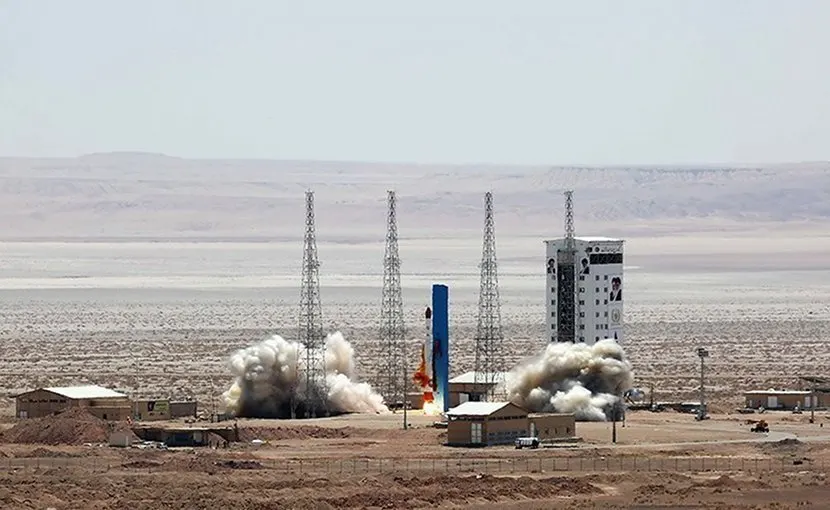
In late July 2017, Iran inaugurated the Imam Khomeini National Space Center with the successful test-launch of a homegrown satellite carrier dubbed Simorgh.
The center, home to Iran’s first fixed launch platform, administrates the development, launch, and navigation of Iranian satellite carriers.
Designed and built in compliance with international standards, the Imam Khomeini National Space Center is going to handle all space projects in the low‑Earth orbit (LEO).
 افزودن تابناک به منابع ترجیحی گوگل
تابناک را در شبکه های اجتماعی دنبال کنید
نظرات بینندگان
هنوز دیدگاهی منتشر نشده است.
دیدگاه خود را بنویسید
سایت تابناک از انتشار نظرات حاوی توهین و افترا و نوشته شده با حروف لاتین (فینگیلیش) معذور است.